
Key Features #
Nature theme has the following features:
- Modern minimalist furniture aesthetic
- Organic curved section transitions
- Interactive hero banners with floating visuals
- Featured collection tabs and curated layouts
- Large lifestyle imagery for storytelling
- Optimized mobile shopping experience
- Fast-loading Shopify OS 2.0 architecture
- Flexible drag-and-drop customizable sections
- Premium typography and spacious layouts
- Conversion-focused product presentation
Specially this theme provides the unique features:
- Page transition effect
- Viewport animation in sections
- Full page scroll effect in full screen sections
- Fully customizable dividers in each sections
The features Excepting for the customizable dividers in each sections are mentions in Theme Settings -> General and we would like to show on this page only how the customizable dividers work.
Unique Features #
Customizable dividers in each sections #
In Nature theme, most of sections has the settings of Section Divider and it is very useful to build the modern landing pages. You can config the top divider and bottom divider in each sections and choose the divider shape.
The default value of divider is “None”, but if you choose other values, then you can configure the divider options such as divider width, divider height and divider color.
You also can use your own custom divider as svg or image, in that case, you can choose the option to “Custom SVG” or “Custom Image”. If you choose an option of “Custom SVG”, then you need to input the svg code and you can choose the color of divider, but If you choose an option of “Custom Image”, then you can set the divider width and height, but you can’t choose the divider color.
In some cases, you may wish to get the inverted vision of the divider. In that case, you can tick on the “Invert divider” option.
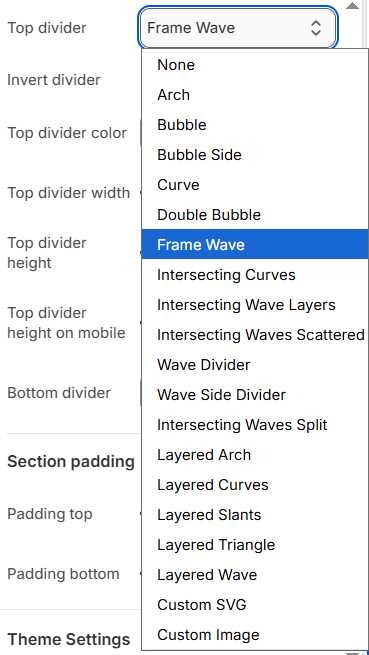
Here are the available divider shapes which you can use.














